The short answer: set up each facial, peel and wax as its own service with the right length, connect the chat apps your clients use, and let a booking bot answer "are you free on Saturday?" while you work. Clients pick a real free time in the chat, get reminders, and the booking lands in your calendar. Here's how to set it up as an esthetician.
Why chat booking suits estheticians
Your gloves are on, your hands are covered in product and the client is under the steamer. You can't stop to reply, and by the time you do, the person who asked about a facial may have booked somewhere else. A booking bot replies straight away in WhatsApp, Telegram, Instagram or Messenger, day and night. Skincare is also repeat work: waxing clients come back every four to six weeks and facial regulars every month, so every booking you don't handle by hand adds up quickly.
Build a menu that blocks the right time
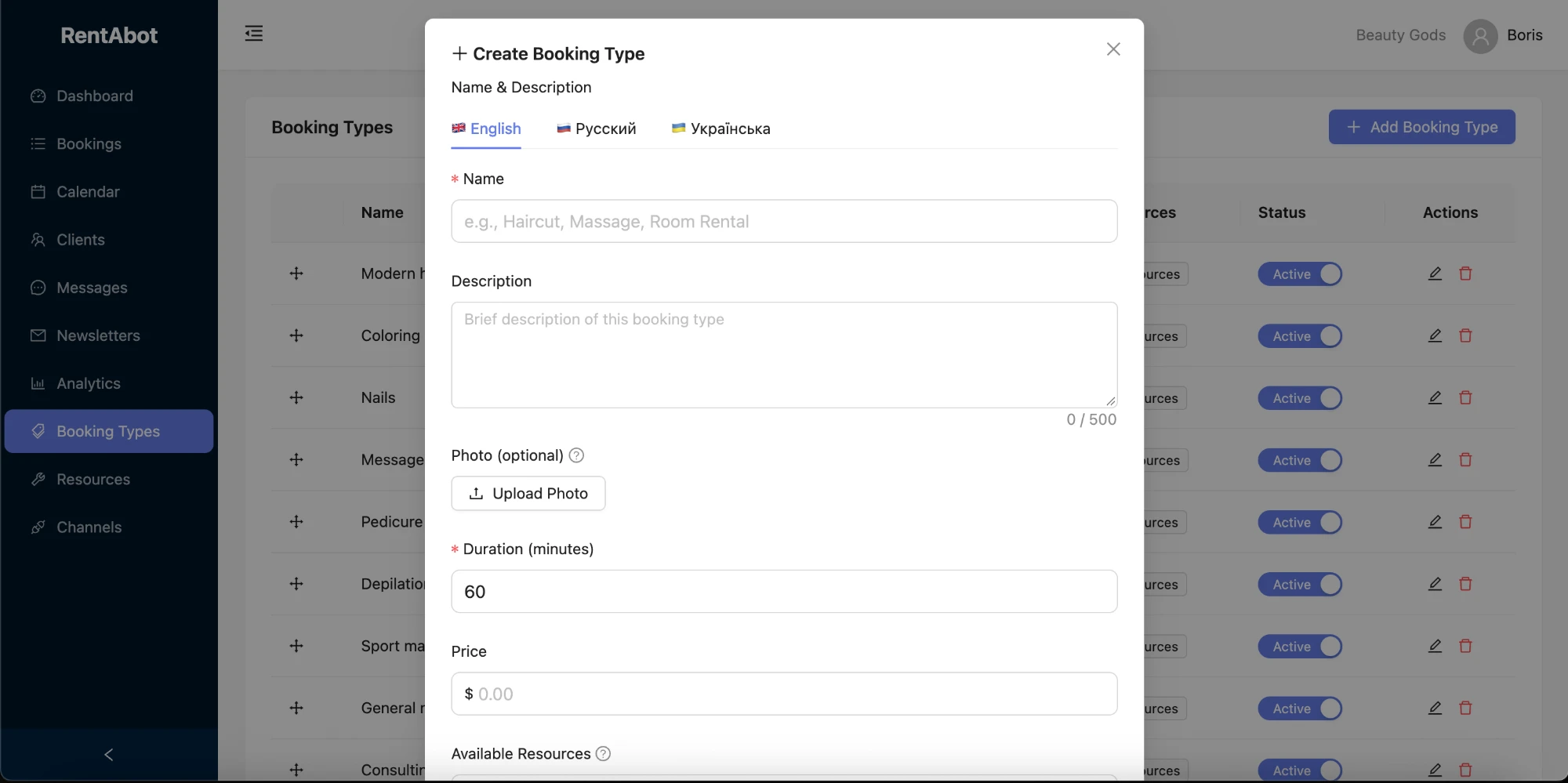
In RentABot every treatment is its own booking type with its own length, price, description and photo. The bot shows these to the client before they choose a time, and it always blocks exactly the time you set:
- Facials: an express facial (30 minutes), a signature facial (60 minutes) and an advanced facial with extractions or LED (75–90 minutes).
- Peels and treatments: chemical peels, dermaplaning and microneedling, each as a separate service.
- Waxing and sugaring: brows and underarms (15 minutes), half leg (30), full leg (45), Brazilian (30–45). Short services like these fill the gaps between facials.
One tip: RentABot books exactly the length you set, with no automatic break in between. If you need 10 minutes to reset the room, add them to the service, for example a 60-minute facial set to 70 minutes. New to the setup? The getting-started guide walks you through it.
Rooms and team, without double bookings
Each esthetician is a resource with their own working hours. If you have two treatment rooms, you can make each room a resource instead. For every service, you choose which resources offer it, so only the colleague trained in microneedling gets microneedling bookings, and two clients never end up in the same room at the same time. Running a full salon menu with nails and lashes too? See the guides for nail & beauty salons and lash & brow artists.
Consultations and prep, handled before the visit
- Skin consultation. Make a short consultation its own booking type, often 15 minutes and free. In the description of your peels and microneedling, say that new clients book a consultation first.
- Prep rules. Put your own instructions in each service description: for example, when to stop retinoids before a peel, avoiding sun and self-tan before treatment, or how long hair should be for waxing and sugaring.
Clients see the description while they book, so you don't have to repeat it in every chat, and fewer appointments get cancelled at the door because someone wasn't ready.
Keep treatment courses on track and no-shows rare
A missed 90-minute facial is a gap that's hard to fill at short notice. RentABot sends automatic reminders the day before and two hours before each appointment, and in the first one clients can confirm or cancel with one tap. That gives you time to offer the slot to someone else. Peels and microneedling often come as a course, so book the next session before the client leaves: open their chat and use Book for Client. More in how to reduce no-shows.
Connect Google Calendar and bookings appear there automatically, while anything you block in Google, such as a training day, stops the bot offering those times. Here's how the two-way sync works.
Get booked from Instagram, Google and the front desk
Put your booking link in your Instagram bio, your Google Business Profile and as a QR code at reception. Here's where to put your booking link so clients actually use it. Connect WhatsApp, Telegram, Instagram and Messenger, and every booking lands in one calendar. All four are on the free plan.
Ready to stop answering "do you have anything on Saturday?" by hand? Start free and set up your treatment menu in an afternoon. Want the big picture first? The overview guide covers all four channels.
Comments
No comments yet. Be the first to share your thoughts or ask a question.